An air purifier is easy to ignore. It sits in the corner, hums quietly, and you assume it is working. But a clogged filter, a blocked intake or a failed fan can leave it running while cleaning nothing. This guide gives you five quick checks.
Most take under a minute, and together they tell you whether the unit is doing its job.
- Check 1: hold a tissue near the outlet — it should be pushed away.
- Check 2: look at the pre-filter — if it is grey and matted, airflow is blocked.
- Check 3: smell the outlet air — it should be neutral, not musty.
- Check 4: watch the particle sensor — it should react when you cook or dust.
- Check 5: listen for a change in pitch — a failing fan sounds different.
On this page
Check the airflow
The simplest test is airflow. Turn the purifier to its highest setting and hold a tissue or a piece of paper near the outlet. It should be pushed away firmly. If the tissue barely moves, the unit is not moving enough air, and the most likely cause is a clogged filter.
You can also feel the intake. A working purifier pulls a noticeable stream of air into the front or sides. If the intake feels weak, something is blocking it.
Inspect the filter
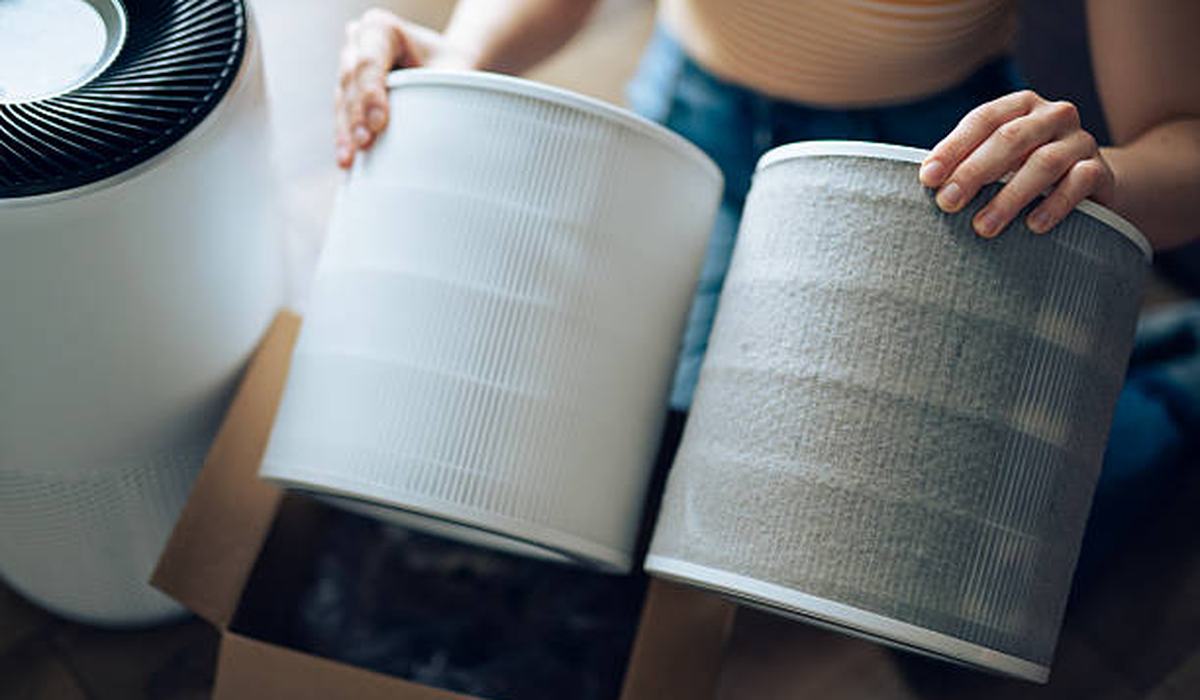
Pull out the pre-filter and look at it. A healthy pre-filter is light grey and loose. A clogged one is dark, matted and stiff. If you cannot see light through the HEPA filter when you hold it up, it is past its useful life.
| Filter state | What it means | Action |
|---|---|---|
| Pre-filter light grey | Working | Vacuum monthly |
| Pre-filter dark and matted | Blocked | Wash or replace |
| HEPA holds light | Still good | Keep using |
| HEPA opaque | Clogged | Replace now |
| Carbon smells musty | Saturated | Replace |
Test the sensor
If your purifier has a particle sensor and an auto mode, test it. Light a match or cook something smoky nearby, and watch the readout. A working sensor will spike and the fan will ramp up. If nothing changes, the sensor is dirty or failed.
Particle sensors get coated in dust and stop responding. Most units have a small sensor cover you can open and wipe with a dry cotton swab. Do this every couple of months.
Listen for changes
A purifier has a steady, even sound. A failing fan bearing adds a rattle, a whine or a clicking that was not there before. If the pitch changes when you tap the unit, the fan is on its way out.
- Rattle — a loose filter or a foreign object in the fan.
- Whine — a worn fan bearing.
- Clicking — debris hitting the fan blades.
- Silence on high — a failed fan or a blown fuse.
- Intermittent stops — a failing motor or a loose connection.
What to do if it fails
- Vacuum or wash the pre-filter and retest the airflow.
- Replace the HEPA filter if it is clogged.
- Clean the particle sensor with a dry swab.
- Check the intake for a blocked grille or a curtain pressed against it.
- Test the fan on each speed setting.
- Contact support if the fan has failed — most units have a 2-year warranty.
To check a purifier is working, test the airflow with a tissue, inspect the pre-filter and HEPA filter, test the particle sensor, and listen for changes in noise. Most failures are a clogged filter, which a vacuum or a replacement fixes.
Frequently asked questions
Replacement filters
A fresh filter is the fix for most purifiers that stop cleaning.